Now the neck wrapper is a little more tricky. See the image below: |
 |
There's that lower portion which is transparent, so we'll need a transparency map here and will use the fast fesnel shader. The color map is simply mapped cylindrically with a width wrap amount of 1. |
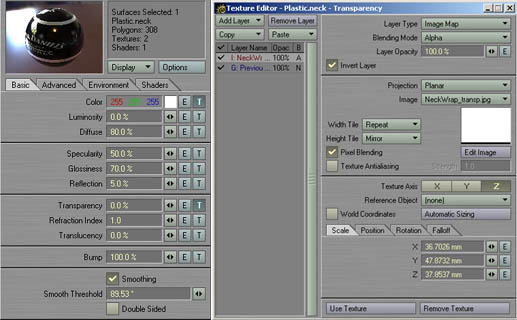 |
Here are the surface settings. The transparency map is simply a copy of the
color map for the neck wrapper with the writing removed and finally inverted.
On the layer beneath it lies a gradient set to 100% (of course you can use "value" for that one...).
Then the transparency map is layed on top of it with blending mode set to alpha (which removes the transparency
in the white area of the texture). Add a fast fresnel shader on the Shaders Tab and
leave the default values, but uncheck "transparency". |
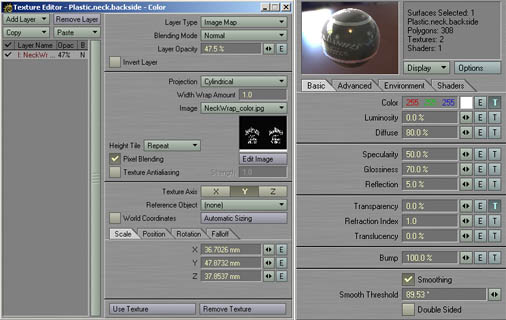 |
Copy the surface settings of the neck wrapper to the surface of it's flipped counterpart. Now you only need to make one minor change: lower the color map's opacity to 47.5% and you're done. |
previous |
next |